A $35 Used Laptop in 2025
Posted in Computers, Homelab, and Linux on November 25, 2025In 2025, a $35 second-hand laptop might sound like e-waste, but for many people it’s still surprisingly useful. Whether it’s retirees on a fixed income browsing the web and reading the news, field techs needing a cheap laptop for on-site work, or anyone looking for a ‘beater’ machine, an old, inexpensive computer often fits the bill perfectly.
Finding our Cheap Laptop
So, what did I do? I went on Facebook Marketplace, where only the finest of merchandise by the most trustworthy of sellers is to be found, filtered by under $50, and scrolled. Ultimately, I ended up buying the first one where the seller responded coherently.
That might sound like a low bar, but if you’ve ever tried buying or selling anything on Facebook Marketplace, you know most people either ghost you completely, make zero sense, or assume you speak a different language.
So, I picked up a 2012 MacBook Pro they had listed for $30 – I didn’t even bother negotiating. It was listed as “2012 Macbook Pro (works kinda)” with one or two blurry pictures that really told me nothing. According to the description, it would power on, but get stuck on a gray screen.
After confirming the charger was included (that’s important – an OEM power adapter costs more than the whole computer is worth), I drove about five minutes to their place and picked it up… off an unlit front porch on a rainy night. Seems legit, right? Well, I survived to tell the tale, and our laptop turned out really nice for the price, so I’m not complaining about it.
Stickers, signs of life, and specs
First impressions were… the previous owner liked stickers. A lot.
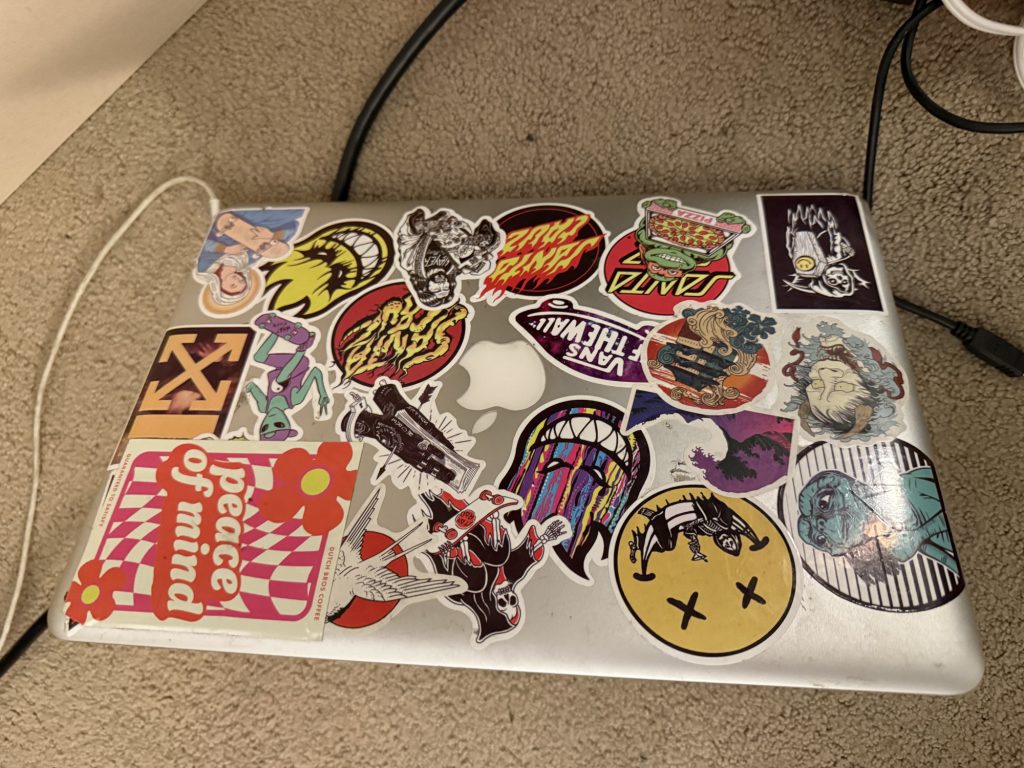
I didn’t even bother troubleshooting why it didn’t boot into macOS – I had an Ubuntu 24.04 LTS USB flash drive ready to go. I pressed the power button, held the option key, chose the USB drive, and was pleasantly surprised with what I found.
Turns out, our budget MacBook Pro 13″ has an i5-3210M, 16GB of RAM (score!), and a 500GB spinning hard drive (eww).
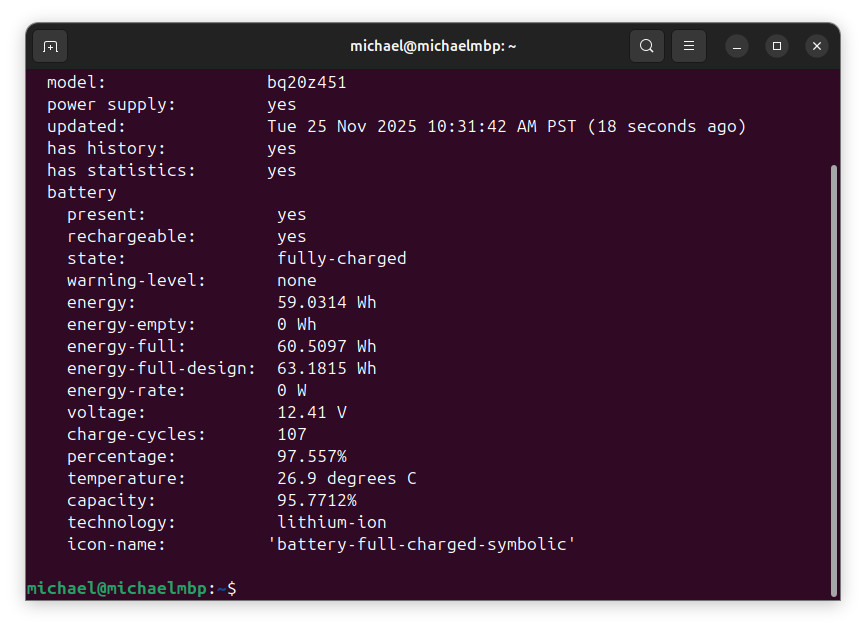
Checking the battery status told us someone had replaced the battery at some point. It only had about 100 cycles on it, and the calculated health/capacity was about 95%. Nice! An hour of web browsing later, we still had over 60% state of charge – which means we should have a usable runtime of about three hours.
Streaming YouTube on older graphics chips
Then, a new problem – YouTube. The Intel HD4000 GPU in our 2012 computer don’t support hardware decoding of H265, VP9, and other modern codecs. So, even at 720P (why stream at 1080P on a 1280×800 display?), it was a stuttery mess. The free “Enhanced-h264ify” Firefox extension fixed that up by forcing YouTube to use AVC1/H264. No more dropped frames, even at 1080P. Nice!
Gotta have an SSD
Now that we know the hardware is mostly in good condition, and our cheap find can do the tasks we need it to do, it’s time to actually make those tasks actually enjoyable. We can’t leave that hard drive in there. Even a low-end solid state drive will deliver WAY better performance than any rotation disk (let alone a 5400RPM drive from 2012), and is also more resilient to being physically moved with the computer powered on.
So, let’s budget $5 for a drive. If you have a local small computer repair shop nearby that sells used parts, or feel like heading back on Marketplace, that’s about the going rate for a used 120GB-class SATA SSD. But, I’m lazy, and wasn’t in a hurry, so I used some Best Buy rewards points that were well on their way to expiry to get this brand new 128GB Silicon Power SSD for $4.89. Shipped and Sold by Newegg, on the Best Buy website – I understand how these marketplaces work, it’s just kinda funny. Is it a great drive? No. Would I pay retail price for that when better options are $5-10 more? Also no. But, if I’m paying less than the price of a latte for it, it’ll do.
A week of waiting for our free shipping, we got our cheap SSD. A handful of little screws later, we pop open our old Mac, take out the trash (oops, I mean, hard drive), and in goes our new best solid state friend. But instead of throwing away that old spinning drive, pick up a USB enclosure like this one for it, and now you have a spacious backup drive for an extra $10. Because you do back up your stuff, right?
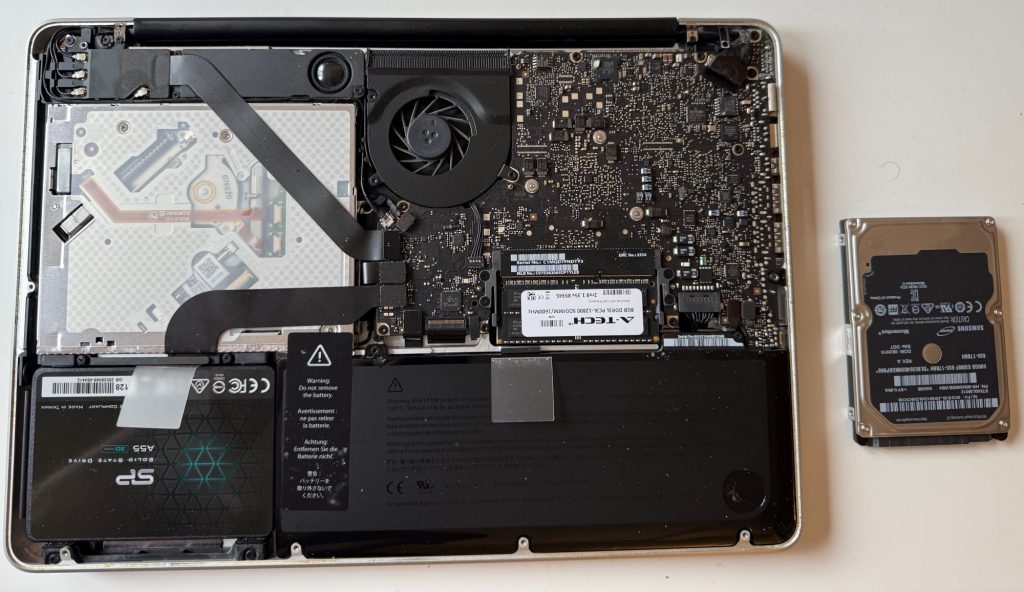
And this time, Ubuntu took about ten minutes to install – not an hour. And boot times went from a painful 3 minutes and 19 seconds (measured from power button to logging in to opening Firefox to the home page) to 37 seconds.
I installed the H264 extension again, tweaked a few settings to my liking, and in the end, for $35, we have a fully functional computer that’s fine for basic web browsing, email, watching movies, and testing ethernet ports. It’s got a DVD drive (not that I’ll ever use that), the nice build quality you’d expect from a Mac, and a three hour battery life.
Don’t judge a (Mac)Book by its cover(ed in stickers).
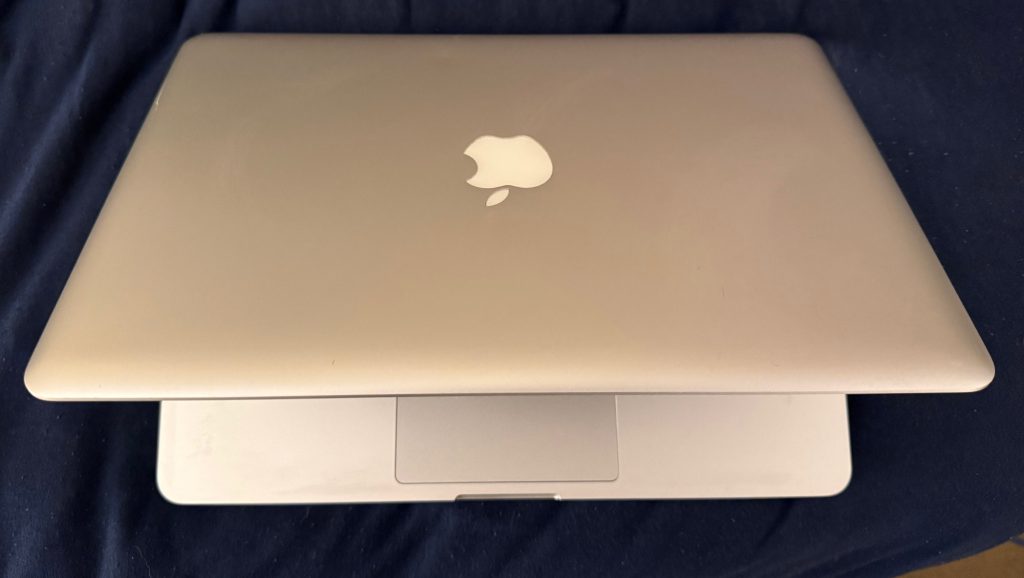
Of course, there was one thing left – those stickers need to go. I was a little worried about what I’d find underneath, but after a two-stage process (first, WD-40 and a razor blade, then Simple Green and shop towels), our $35 computer looks almost brand new!
In Conclusion
At the end of the day, the point I’m trying to make is, a very cheap used computer can be worth having around. Or, if you already have an old laptop floating around somewhere, it could be worth throwing a cheap SSD in there and giving it a second life.
Just remember, you’ll probably have to be willing to deal with some flavor of Linux – because you likely aren’t getting a computer that supports Windows 11 or macOS 26 at this price point. Windows 10 lost support and updates on October 14, 2025, and macOS 13 reached end of life on September 15, 2025.
I generally recommend Ubuntu, because it’s got so much community support, and you can find how-tos for almost every scenario online. But, if you don’t like Ubuntu for whatever reason, there are plenty of alternatives – Linux Mint, Elementary OS, Zorin, Pop!_OS, Fedora, etc – and at the end of the day, the choice is yours. Heck, try them all! Just keep in mind that I learned the hard way that if you want effortless WiFi support on a 2012 MacBook Pro, you should stick with Ubuntu 24.04 LTS, instead of trying 25.10.
Concluding the Conclusion
A sub-$50 used computer is great for:
- Basic web browsing
- Light email usage
- Simple word processing.
- Watching movies and streaming video (if you can get the website to use an older media codec).
- Configuring network devices on job sites where an Ethernet port is more useful than a fast CPU.
- Using as a spare computer for tasks where dropping or losing the computer is likely.
Things to look for when buying a cheap laptop:
- Either an SSD or the ability to install one. Some really cheap PCs use soldered eMMC storage, which is pure trash. If the laptop has a regular mechanical hard drive, you’re almost guaranteed to be able to replace it with a 2.5″ SATA SSD. NVMe is a newer standard that offers better performance in a smaller space, but I don’t think you’ll find many NVMe capable computers for $35. Some newer PCs (and all newer Macs) use soldered storage, but depending on how much space you need, this may or may not be an issue. How hard it is to replace the disk on a particular model of laptop varies greatly, but for most computers, it takes about 10 minutes to swap out a 2.5″ SATA HDD with an SSD.
- Backlit keyboard. Personally, this is a must-have. Yes, I can type 100WPM+ without looking at the keyboard, but every laptop has a different configuration for the function keys, and trying to figure out which keys manage the screen brightness or speaker volume is annoying AF if you’re using the computer in a dark space or use multiple computers often.
- Try to avoid used high end laptops with discrete graphics. I know it’s counter-intuitive that a high end computer could be less reliable, but the most issues I’ve had with motherboard failures are on systems with dedicated graphics, like mobile workstations and gaming laptops. Also, they often have poor battery life, are quite heavy, and Linux compatibility can be iffy.
- Overall condition. You can’t be too picky, at this price point, but I’d avoid computers with obvious physical damage. If the hinge is shot and the screen flops around, the USB ports are broken, and the keyboard is missing a few letters, you’re going to hate your life.
- Location. Don’t forget that time is money, too. Don’t drive two hours more and pay a bridge toll just to save an extra $10.